System freeze on boot / Explorer not closed properly - Fences 6.5.4.1

Windows Version Number: Windows 11 Pro 25H2
App Version: 6.5.4.1.

Hello,

I own Fences 6 (purchased license) and I'm currently on version 6.5.4.1.

 I'm experiencing the following issue sporadically (not on every boot, roughly once or twice day): 
- Windows 11 Pro 25H2
- Dual-monitor setup
- Shortly after boot, when I click on any icon or open any program,
the entire system freezes completely (mouse cursor still moves,
but keyboard and all windows become unresponsive)
- I have to hard-reset the PC every time this happens

Additionally, only on the boot right after such a hard-reset
(not on normal boots): desktop icons appear first, Fences frames
load 1-2 seconds later. Sometimes Fences also shows this message
on that boot: "Fences has detected that Explorer was not closed
properly. As a precaution, Fences has been disabled."

I found other users reporting a similar issue in this thread:
forums.stardock.com/541324 (Fences v6.20 Freezing & File Explorer
Right-Click Issue on Multi-Monitor Setup, Windows 11 25H2)

In that thread, a Stardock staff member recommended rolling back
to version 6.2.

Could you please provide me with a download link for Fences 6.2,
so I can test whether downgrading resolves this issue?

Thank you very much.

Moved thread to Fences area

223 views 6 replies
Reply #1 Top

Hello,
Sorry to hear you are having issues. I visited that thread, and I recalled asking to roll back to v6.2 just due to that v6.44 have some issue then. But, from what I understand, the issue was resolved on later release. Also, Stardock do not provide links for older version for download.

Moving forward, would like to make sure Fences get properly install. Please try purge and reinstall steps as mention here : [Link]. Just make sure to redownload the latest version from your account page. Reboot after the purge. Reinstall and reboot again after the installation. Retest and report back here.

If the issue still appear, we need to know your Windows 11 25H2 OS Build number. Use Winver.exe. Should be available in your system.

Thank you,
Basj,
Stardock Community Assistant.

Reply #2 Top

Hello Basj,

Thank you for the reply. I performed the purge and clean reinstall
as instructed (using the Purge_Fences.zip tool, followed by a fresh
download and install).

Unfortunately, the issue still occurs - it happened again on the
first boot after the reinstall.

My Windows 11 25H2 OS Build number is: 26200.9457

Please let me know what further information you need or what else
I can try.

Thank you.

Reply #3 Top

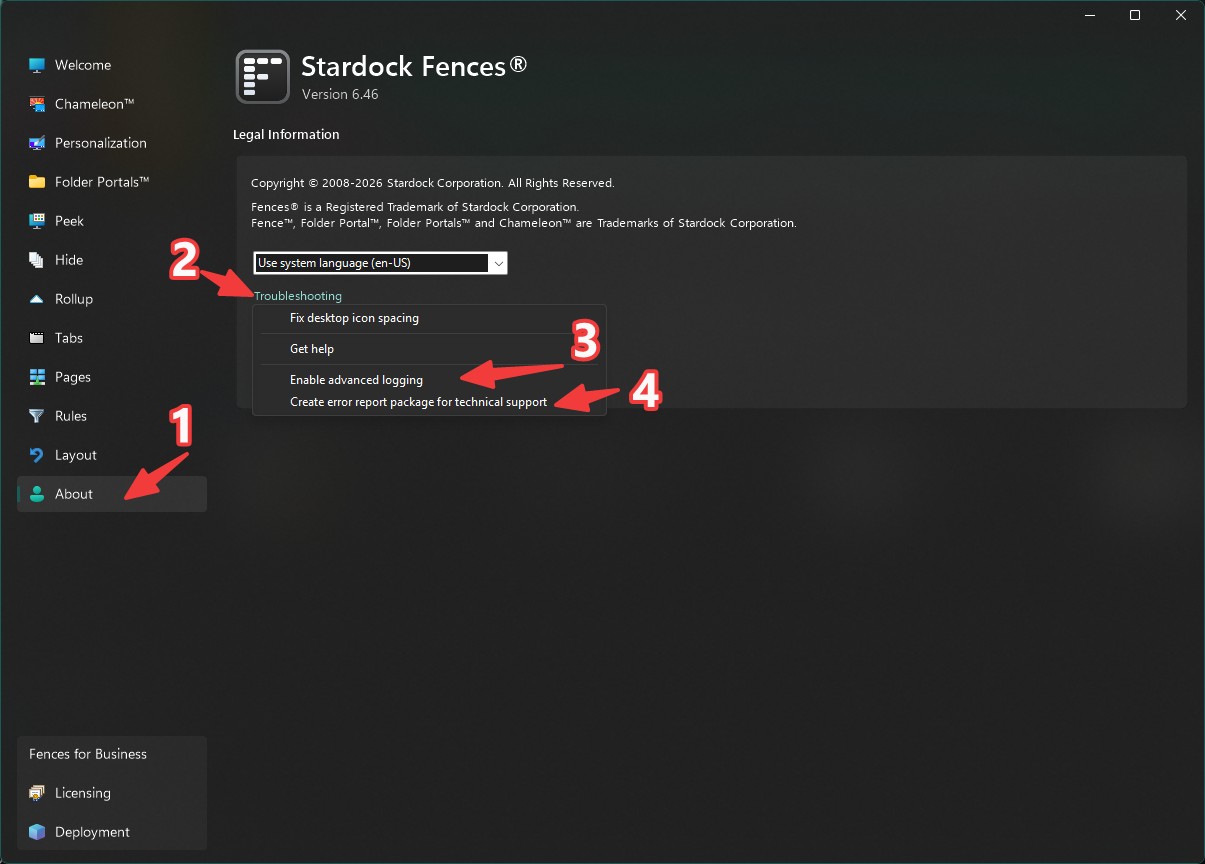
Please turn on Advance logging. Reboot your system. Reproduce the issue. Once that happen, Create error report package, follow the instruction in there to send in the report for Support/Dev team to review it.

Thank you,


Basj,
Stardock Community Assistant

Reply #4 Top

Hello Basj,

I dug through the log files myself and found the exact freeze point.

In "TroubleshootingLog/fences_debug_info_shellext.txt", around
timestamp 2026-09-18 15:28:36, the log is in the middle of Fences'
icon-sorting routine during startup ("Sorted icon [0]...[23]...").
The log entry for icon #23 in group "BBB" is cut off mid-word
("...curr" instead of "current:") - meaning Fences froze exactly
at that point.

4 minutes later (15:32:37, after my hard-reset), a new Fences
process starts normally (visible in the same log file).

This suggests the freeze happens during Fences' own desktop icon
sorting process at startup, possibly related to a specific icon
or the number of icons being processed (I have a large number of
desktop icons across two monitors).

Hope this helps narrow down the issue.

Reply #5 Top

Hello Basj,

Additional update - I had two more freezes since my last message.
I generated another local error report file (not sent separately)
and looked through it myself. Found two more freeze points:

Freeze #2 (17:10:10 to 19:02:16, ~112 min gap):
Log cuts off mid-word in a different function this time:
"ZOrderPerformMaintainIfNeeded" (handling WM_TIMER), cut off at "WM_T..."

Freeze #3 (19:04:37 to 19:09:19, ~4.7 min gap):
Log cuts off again during the icon-sorting startup routine, but
this time at a DIFFERENT icon (icon #3, "TeamViewer.lnk") compared
to the first freeze (icon #23, a different folder). This rules out
a specific problematic file/folder as the cause - it's not tied to
one particular icon.

So in total, I now have 3 confirmed freeze points, all occurring
inside Fences' own internal processing (either the icon-sorting
loop or the Z-order maintenance timer), each time with the log
cut off mid-word - suggesting Fences itself is hanging/deadlocking
internally, not waiting on one specific external file.

This looks more like a threading/synchronization issue within
Fences (e.g. a deadlock between internal threads) rather than an
issue with a specific desktop file or folder.

Let me know if you'd like me to send this new report package as well.

Thank you.

Reply #6 Top

If the Fences debut output is cut out mid-word, that means very definitively that Fences is not involved in the crash.