HDR
from  Stardock Forums
HELLO
Would it be possible to release a version that supports HDR?

I would like HDR support as well. Some of my wallpapers look a bit flat on an HDR display, so having the extra color range would make a real difference. I hope the team considers it for a future update.
Hello,
Sorry to hear you are having issues. I tested, with HDR turn on and I don't see any issue. I am running Windows 11 25H2 OS Build 26200.9818 with Deskscape 11 v26.0.1.1. What issue/s do you actually get when turning HDR on with Deskscapes animated wallpaper running? Please elaborate.
Thank you,
Basj,
Stardock Community Assistant.

When I select an HDR video, the colors are very pale—to the point where a non-HDR video actually has more color.
It’s clear to me that the application does not support HDR.
When I select an HDR video, the colors are very pale—to the point where a non-HDR video actually has more color.
It’s clear to me that the application does not support HDR.
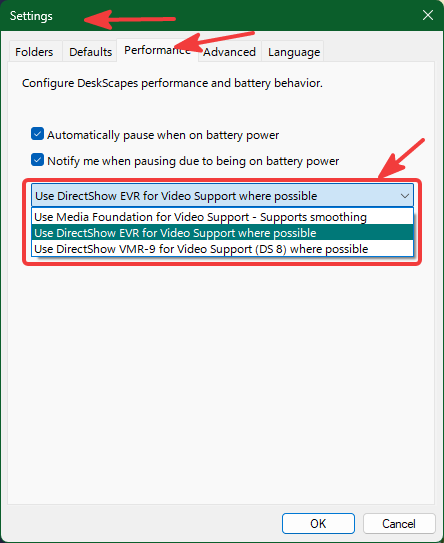
Have you tried changing these video setting and see if any other one work better for you?
Thank you,
Basj,
Stardock Community Assistant
It makes absolutely no difference to the colors, regardless of the option chosen; there is no support for HDR
Can you post a link to one of those HDR animated wallpaper so that I can test it out in my system.
Thank you,
Basj,
Stardock Community Assistant
Yes, no problem; here is an example of a video that isn't recognized as HDR in DeskScapes, even though it plays in HDR in all Windows media players.
Can you tell me how to download this video without losing its HDR quality?
Thank you,
Basj,
Stardock Community Assistant
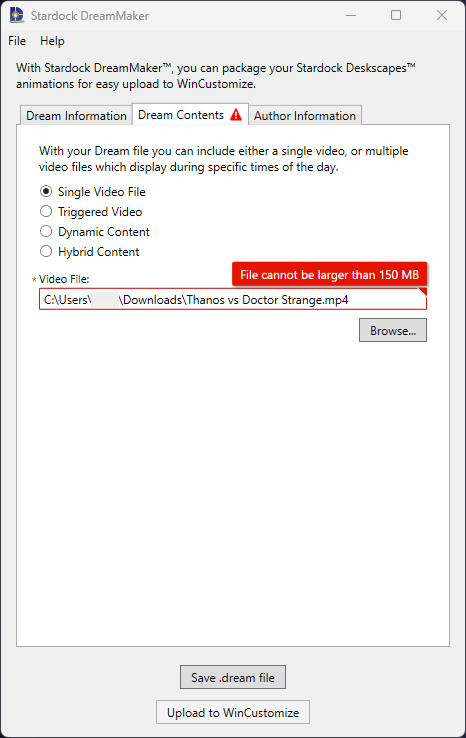
Unfortunately that video you send is bigger then 150MB, it is 393K, I can't make it into a .dream file, to test it. Not sure I can properly cut that video down without loosing its quality specially HDR content.
Moving forward, I have forwarded your problem/question to Stardock Support Team for their assistance. Please keep an eye on this thread for any updates. We appreciate your feedback and patience. Thank you.
Basj,
Stardock Community Assistant
There’s no need to convert it to a .dream file; DeskScapes can play MP4 videos. All that would be required is a software update to add support for HDR—which was my original question!
As I mentioned above, the issue has been forward to Support, please wait for their respond. Appreciate your feedback and patience.
Thank you,
Basj,
Stardock Community Assistant
Welcome Guest! Please take the time to register with us.
Select a reason for giving karma:
You're about to visit an external site:
Sign up here to get the latest news, updates, and special offers delivered directly to your inbox.